
WhatConverts Review: How I Use It to Improve PPC Lead Quality
If you’re running Google Ads and struggling with lead quality, you’re not alone.
It’s one of the most common issues I see when taking over accounts.
On paper, everything can look fine. Cost per lead is reasonable, conversion volume is strong, and campaigns are generating enquiries.
But when you look at actual outcomes, it’s a different story.
A large percentage of those leads don’t turn into revenue.
That’s the gap most tracking setups miss.
And it’s exactly why I started using WhatConverts across my PPC clients.
What is WhatConverts?
At its core, WhatConverts is a lead tracking and call tracking platform.
It tracks:
- Phone calls with recordings
- Form submissions with full data
- Live chats and other lead types
- The exact source of each lead
So instead of just seeing that a conversion happened, you can see:
- Where it came from
- What keyword or campaign drove it
- What the actual enquiry was
That alone is useful.
But that’s not the main reason I use it.
The real reason I use WhatConverts
The biggest advantage of WhatConverts is that it lets you track lead quality, not just lead volume.
Inside the platform, you can mark leads as:
- Qualified
- Not qualified
- Sale, with a value attached
This is where things change.
Because once you have that data, you can send it back into Google Ads.
Instead of telling Google:
Get me more leads
You’re telling it:
Get me more of these leads
That’s a completely different signal.
How I use WhatConverts with Google Ads
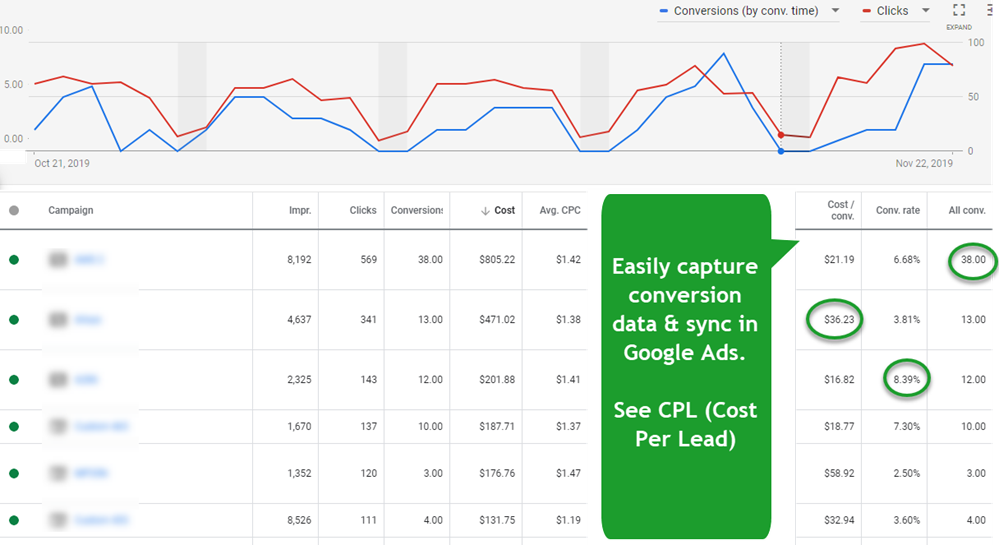
My setup is usually straightforward.
First, we track all leads through WhatConverts. Calls, forms, everything.
Then the client reviews those leads and marks which ones are actually worth something.
From there, I feed that data back into Google Ads as conversions.
Typically, that means:
- Only sending qualified leads
- Or ideally, sending actual sales values
Once that’s in place, I move campaigns onto bidding strategies that use that data properly.
That’s where you start to see the difference.
What results can you expect?
When this is set up properly, the impact is usually clear.
You’ll often see:
- Lower cost per qualified lead
- Less wasted spend on poor quality traffic
- Better performance from automated bidding
- More stable results over time
In some accounts, campaigns that looked strong initially drop off once quality is factored in.
And others become the top performers.
It gives you a much clearer picture of what’s actually working.
A quick real-world example
I recently worked on an account where a large number of calls weren’t being counted as conversions.
They had a rule set to only count calls over 30 seconds.
So missed calls that were called back later weren’t included.
Google was optimising based on incomplete data.
Once we fixed that and pushed all relevant calls back into the account, performance improved quickly.
Not because we changed campaigns.
But because we fixed the data.
Why not just use Google Ads or GA4?
This is a common question.
Google Ads and GA4 can track conversions, but they can’t easily track what happens after the lead.
They don’t tell you:
- Whether the lead was any good
- Whether it turned into a sale
- Which leads are actually worth optimising towards
You can try to solve this with a CRM, but in most cases:
- It’s slower to implement
- Harder to manage
- Not as tightly connected to your campaigns
WhatConverts sits in the middle and makes this process much simpler.
Is WhatConverts worth it?
If you’re running Google Ads and care about lead quality, then yes.
Especially if:
- You’re generating a high volume of leads
- You’re using automated bidding
- You want to improve ROI, not just reduce CPL
It’s one of the most practical tools I use.
Not because it’s complex or advanced, but because it solves a very real problem in a simple way.
Should you use it?
If you’re happy optimising for lead volume alone, probably not.
But if you want to:
- Improve lead quality
- Reduce wasted spend
- Give Google better data to optimise with
Then it’s well worth looking at.
You can check out WhatConverts and see how it fits with your setup.
Final thoughts
Most PPC accounts don’t have a campaign problem.
They have a data problem.
Once you fix that, everything else becomes easier.
Better data leads to better optimisation.
Better optimisation leads to better results.
For me, WhatConverts is one of the simplest ways to do that. You can vist What Converts here - https://www.whatconverts.com/

More blogs
Google Ad Grants UK: A Complete Guide for Charities
The Google Ad Grant gives eligible UK charities up to around £7,400 per month (set by Google as $10,000 USD) in free Google Search advertising. This 2026 guide covers eligibility, application via Goodstack, current rules, Performance Max availability, and how to get value from the grant.

How to Track Google Ads Spend and Pacing Automatically with a Script
With this script, you’ll no longer have to worry about manual spend tracking or pacing analysis. It’s a simple, automated solution to keep your campaigns on budget and performing optimally.
