A PPC audit is the first thing I do on every new account. This is the checklist I work through, in the order I work through it, with notes on what I'm actually looking for at each step.
If you've been asked to audit a Google Ads account and aren't sure where to start, or you want to check your own account before handing it to someone else, this is the process I use as a PPC freelancer. It's long because audits should be. A quick skim of the campaigns tab tells you very little. The problems that cost real money are usually in the tracking, the search terms and the landing pages, and you have to go looking for them.
One thing before the list. The order matters. I always start with conversion tracking, because if the data is wrong, everything else you look at is built on sand.
1. Conversion tracking (start here)
If this isn't set up properly you're flying blind, and so is Google's bidding. Before I look at a single campaign I check what the account is counting as a conversion and whether it's true.
- Accuracy: Are all the conversion actions that matter being tracked (form submissions, phone calls, transactions), and are the tags actually firing? Test them. I've lost count of the accounts where a form conversion was double counting or a call conversion had quietly stopped working after a site change.
- What counts as primary: Which actions are set as primary and feeding bidding? An account optimising towards page views or "contact page visits" will look busy and produce very little.
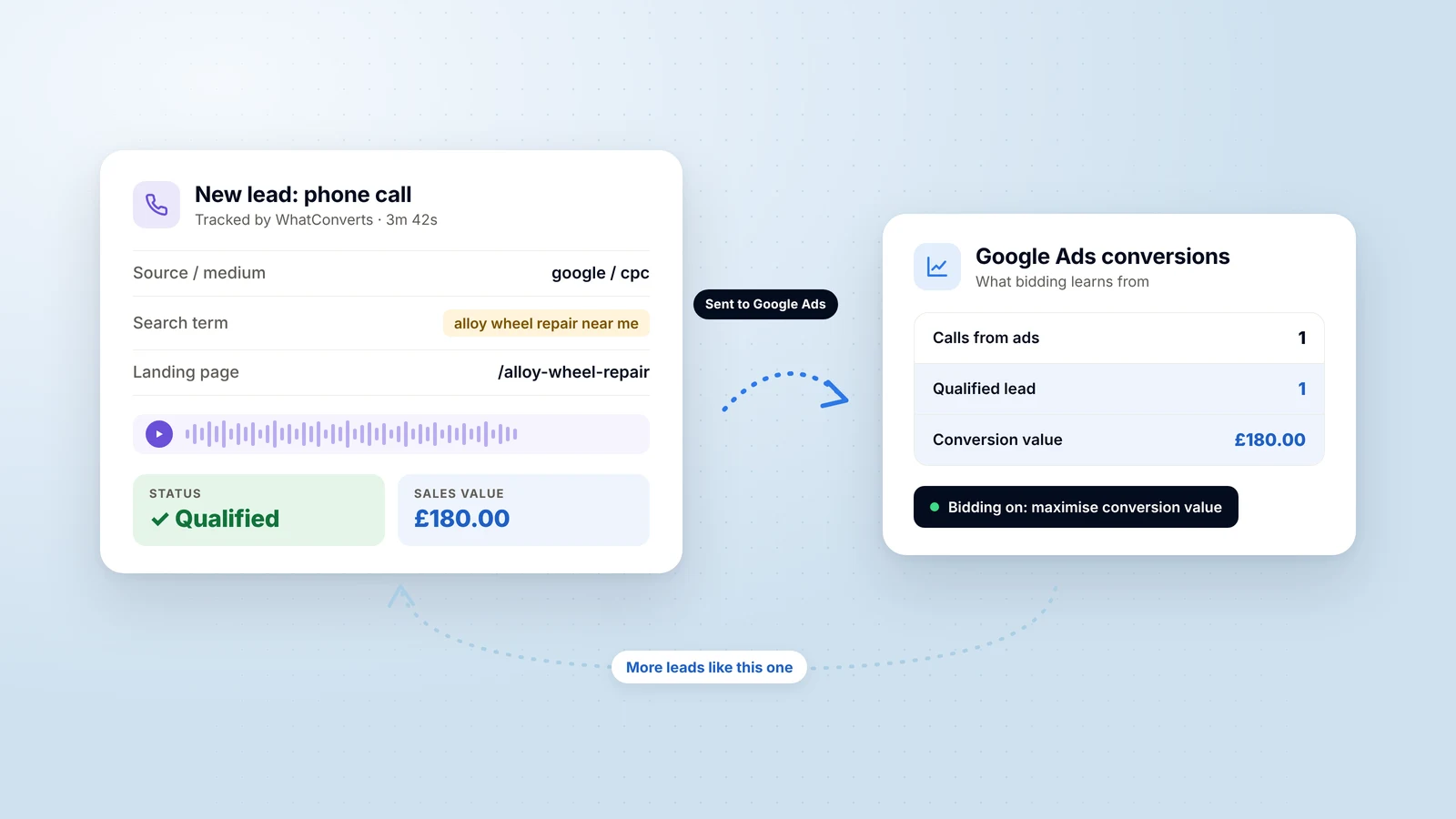
- Lead quality: Is there any feedback on whether leads were any good? If the account is bidding on raw form fills, it's optimising for volume, not customers. Sending qualified leads or sales values back into Google Ads is usually the single biggest improvement available.
- Attribution: Is the attribution model sensible for the business, and are conversion windows reasonable for the sales cycle?
2. Account structure
Take a step back and look at the big picture. Is the account organised in a way that makes sense? If campaigns are all over the place it's like a messy room: you can't tell where to focus.
- Campaigns and ad groups: Are they logically organised? Ad groups should be tightly themed so the ads can be specific to the keywords in them.
- Keyword organisation: Are keywords properly grouped? Splitting mixed ad groups into more specific ones usually improves relevance and makes bidding cleaner.
- Naming conventions: Consistent naming for campaigns, ad groups and ads keeps the account easy to manage and makes reporting far less painful.
3. Keyword analysis
Are we targeting the right terms? This is where a lot of wasted budget hides.
- Match types: Which match types are in use and how does each perform? Broad match can drive irrelevant traffic if it's left unchecked, particularly without good conversion data behind it.
- Negative keywords: Are there enough? I use them religiously. Review the search terms report and add negatives for anything that's spending without converting.
- Keyword bidding: Are there high CPC keywords that aren't converting, or low search volume terms that never will? Weed them out.
- Search terms: Are the actual queries relevant? Pull the search terms across all campaigns and the full date range so you see each term's total spend, not a partial view. Consider adding the strong performers as exact match.
4. Ad copy and assets
Ads need to match the keywords. There's no point targeting "nursery services in Bedford" if the ad copy is generic.
- Relevance: Does the copy speak directly to the search intent, with a clear call to action?
- Testing: Are responsive search ads given enough headline and description variety to test with, and are weak assets being replaced?
- Assets (formerly extensions): Are sitelinks, callouts, structured snippets, call and location assets all in place where they make sense? They improve click-through rate and give people more reasons to click.
5. Landing page experience
This is where a lot of campaigns go wrong. I've seen clients pour money into PPC while their landing pages quietly fail to convert.
- Relevance to the ad: Does the landing page deliver on the promise made in the ad and match the keywords? A mismatch hurts Quality Score and conversions.
- Conversion optimisation: Clear calls to action, a layout that's easy to follow, fast loading. If the bounce rate is high, the landing page is often the problem.
- Mobile: Check every landing page on a phone. Most traffic is mobile and a page that's awkward on a small screen will cost you.
6. Targeting settings
- Locations: Are you targeting the right places and excluding the wrong ones? Check the location report for anomalies, and check the setting for "presence or interest" versus "presence", which catches a lot of accounts out.
- Ad scheduling: Are ads showing at the times that produce conversions? Adjust the schedule based on when enquiries actually come in and whether anyone is there to answer the phone.
- Devices: Compare performance across mobile, desktop and tablet. Sometimes ads convert far better on one than another, and bids or budgets should follow the conversions.
7. Bidding strategy
Bids and budget are the nitty-gritty. Are we overbidding on keywords that don't perform? Are some campaigns running out of budget early in the day?
- Strategy fit: Is the bidding strategy (Manual CPC, Target CPA, Maximise Conversions, Target ROAS) matched to the goal and, just as importantly, to the amount and quality of conversion data available? Smart bidding on bad data makes things worse, not better.
- Targets: Are CPA or ROAS targets realistic against what the account has actually achieved? Targets set too aggressively starve campaigns of traffic.
- Bid adjustments: Are location, device and audience adjustments in place where they're still relevant to the strategy in use?
8. Quality Score
A low Quality Score means you pay more for every click. It's made up of ad relevance, expected click-through rate and landing page experience, so break it down keyword by keyword and see which component is dragging it down. Usually it points you back to steps 3, 4 and 5.
9. Budget and pacing
- Allocation: Is budget going to the campaigns that produce results, or spread evenly regardless of performance? I usually move money towards what's working and trim what isn't.
- Pacing: Is the account over- or under-spending through the month? Campaigns limited by budget mid-month are a sign something needs rebalancing.
- Spend versus performance: Compare spend against conversion rate, cost per conversion and return on ad spend. Are you getting a return, not just clicks?
10. Competitor analysis
- Auction Insights: How do you compare with competitors on impression share, overlap and outranking share? Are you being outbid on the terms that matter?
- Their ads and keywords: Look at competitor ad copy and offers to spot gaps and opportunities in your own messaging.
11. Audience targeting
If you're not using audiences at all you're missing out, even on search campaigns.
- Remarketing: Are audiences set up to capture site visitors and past converters, and are they being used for observation or targeting?
- Demographics: Review age, gender and household income performance and adjust or exclude based on who actually converts.
12. Performance metrics
- Click-through rate: Low CTR usually signals poor ad relevance or targeting problems.
- Conversion rate: Compare across campaigns, ad groups and keywords. Poor conversion rates often point to landing page or targeting issues.
- Cost per acquisition: Identify high-cost keywords and placements to adjust or pause.
- Return on ad spend: If revenue is the goal, judge campaigns on profitability, not on cost per lead.
13. Campaign goals alignment
- Goal setting: Are the campaigns aligned with what the business actually needs (qualified leads, sales, applications), and do the KPIs reflect that?
- Conversion funnel: Is the path from click to conversion efficient? Lots of clicks and no conversions usually means a problem in the middle of the funnel, not with the ads.
14. Platform features and automation
- Campaign types: Is the account making sensible use of Performance Max, Demand Gen and responsive search ads, or relying on them where there isn't the conversion data to support them?
- Automation: Are there opportunities for automated rules or scripts to manage budgets, pacing and alerts, so problems get caught before the month-end report?
What to do with the findings
An audit is only useful if it turns into a short, prioritised list of changes. I rank findings by likely impact, and nearly every time the top of that list is tracking and search terms rather than anything clever. Fix those first, give the account a few weeks of clean data, then work down the list.
If you'd like a second pair of eyes on your Google Ads account, I carry out audits for businesses across the UK. Get in touch and I'll tell you plainly what I'd change and why.